Azure Platform Acceleration

Ship a Governed Azure Landing Zone in Days, Not Months

Platform Landing Zone gives your team a modular Terraform blueprint to launch secure, compliant, and observable Azure foundations with less risk and faster delivery.

6 Core Modules Ready for governance, network, security, monitoring, and subscriptions.
4 Deployment Profiles Cost-aware profiles from free-tier validation to full governance.
Infrastructure as Code Repeatable and auditable platform rollout with Terraform.
1. Key Features

Everything Needed for a Modern Azure Foundation

Modular Terraform Design

Build and evolve your platform with independent modules for each capability area.

Security by Default

Baseline controls for key management, segmentation, and enterprise-grade platform hygiene.

Observability Ready

Integrate monitoring components so operations teams can detect and respond faster.

Governance Guardrails

Apply policy-driven controls to keep subscriptions and workloads aligned with standards.

Technology Stack

Built on Trusted Cloud and Infrastructure Tools

IaC

Terraform

Modular infrastructure provisioning with reusable modules across environments.

AZ

Microsoft Azure

Enterprise cloud foundation for identity, networking, governance, and workloads.

PS

PowerShell

Operational automation through deployment scripts and repeatable run workflows.

MM

Mermaid

Living architecture and project structure diagrams rendered directly in the page.

GH

GitHub

Versioned platform codebase enabling collaboration, review, and evolution over time.

2. How It Works

Simple Workflow from Plan to Production

01

Select Profile

Pick dev, test, or prod tfvars profile based on scope, cost, and governance depth.

02

Initialize & Plan

Run Terraform init and plan to validate dependencies and expected infrastructure changes.

03

Apply Changes

Apply the selected profile to deploy your landing zone baseline safely and consistently.

04

Iterate by Module

Expand capabilities over time by refining individual modules without rebuilding the platform.

terraform init
terraform plan -var-file="environments/dev/free-tier.tfvars"
terraform apply -var-file="environments/dev/free-tier.tfvars"
3. Benefits

Outcomes Your Team Cares About

Faster Platform Delivery

Launch a standardized Azure baseline quickly so product teams ship workloads sooner.

Lower Operational Risk

Reduce misconfiguration and drift with repeatable code, policy controls, and shared patterns.

Predictable Growth Path

Start cost-efficient in dev and scale into a full governance model without re-architecting.

4. Testimonials

Social Proof from Platform Teams

"We moved from ad-hoc setup to a governed baseline in one sprint. The modular layout made adoption straightforward."

Cloud Architect, Enterprise IT

"The profile approach helped us validate quickly in dev and scale to production controls without churn."

DevOps Lead, SaaS Organization

"Our onboarding improved because every team now starts from the same secure platform foundation."

Platform Engineer, FinTech Team
5. Plans

Choose the Right Deployment Depth

Free Tier Validation

Low Cost

For quick experimentation and baseline validation.

  • Uses dev free-tier tfvars
  • Fast deployment cycle
  • Budget-conscious defaults
Recommended

Balanced Platform

Mid Cost

For teams needing solid controls and practical operations coverage.

  • Uses test balanced tfvars
  • Improved resilience posture
  • Good speed-to-governance ratio

Full Governance

Enterprise

For mature environments requiring comprehensive controls.

  • Uses prod full-platform-governance tfvars
  • Advanced network/security stack
  • Management group policy assignments
6. Images & Architecture

Visualize the Platform from Structure to Service Topology

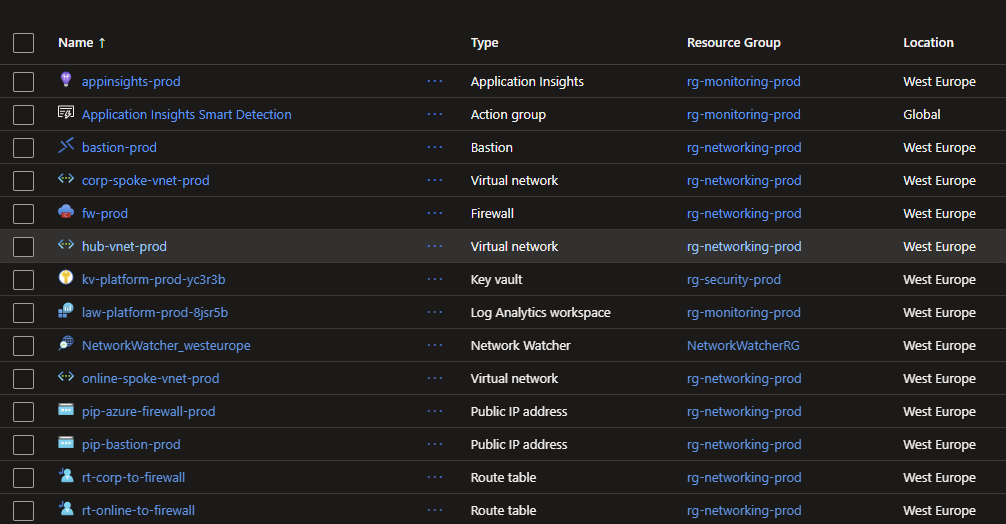
Landing zone resources
Landing Zone Resource Overview
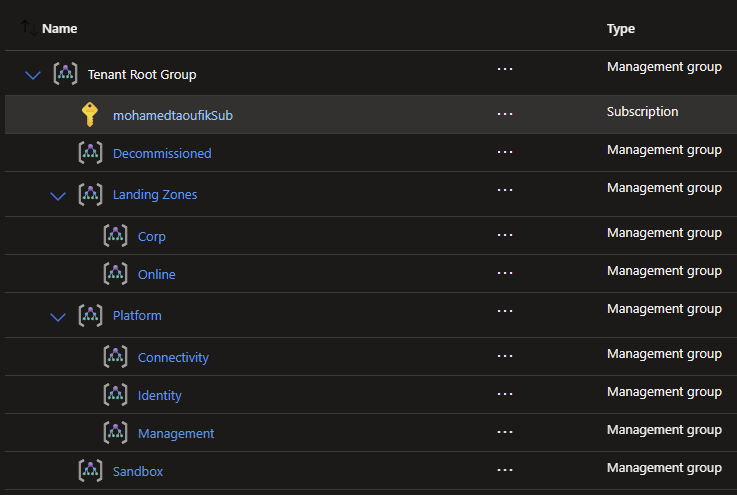
Management groups view
Management Group Diagram
Azure architecture diagram
Azure Architecture SVG
Project structure diagram
Project Structure SVG
flowchart LR Tenant[Azure Tenant] --> MGRoot[Management Group Hierarchy] MGRoot --> MGPlatform[Platform MG] MGRoot --> MGLZ[Landing Zones MG] MGRoot --> MGSandbox[Sandbox MG] MGRoot --> MGDecom[Decommissioned MG] MGPlatform --> MGIdentity[Identity MG] MGPlatform --> MGManagement[Management MG] MGPlatform --> MGConnectivity[Connectivity MG] MGLZ --> MGCorp[Corp MG] MGLZ --> MGOnline[Online MG] MGConnectivity --> SUBConn[(Connectivity Subscription)] MGManagement --> SUBMgmt[(Management Subscription)] MGIdentity --> SUBId[(Identity Subscription)]
flowchart TB Root[PlatformLandingZone] Root --> Main[main.tf] Root --> Provider[providers.tf] Root --> Vars[variables.tf] Root --> Output[outputs.tf] Root --> Env[environments] Env --> Dev[dev] Env --> Test[test] Env --> Prod[prod] Root --> Mods[modules] Mods --> MG[management-groups] Mods --> Net[networking] Mods --> Sec[security] Mods --> Pol[policies] Mods --> Mon[monitoring] Root --> Script[scripts/deploy.ps1]
7. FAQ

Common Questions

Can I start small and scale later?

Yes. Start with the free-tier profile for validation, then move to balanced or full governance as requirements grow.

Do I need tenant-root permissions?

Only for management-group scoped governance operations. Use the permission-safe full profile when those permissions are unavailable.

Is this suitable for multi-environment setups?

Yes. The repository is structured around environment-specific tfvars for dev, test, and prod operations.

How quickly can I run a first deployment?

Most teams can run plan and initial apply in under an hour once Azure credentials and provider configuration are in place.